


The {optimizeR} package provides an object-oriented
framework for optimizer functions in R and adds convenience features for
minimization and maximization.
You probably do not need this package if you…
{optimx},
a framework for comparing about 30 optimizers;You might find the package useful if you want to…
{optimx} or
other frameworks (see the CRAN Task View:
Optimization and Mathematical Programming for an overview);The following demo is a bit artificial, but it showcases the package purpose. Assume we want to
stats::nlm and
pracma::nelder_mead.We can do this task with {optimizeR}. You can install
the released package version from CRAN with:
install.packages("optimizeR")Then load the package via library("optimizeR").
1. Define the objective function
Let \(f:\mathbb{R}^4\to\mathbb{R}\) with
f <- function(a, b, x, y) {
  a * exp(-0.2 * sqrt(0.5 * (x^2 + y^2))) + exp(0.5 * (cos(2 * pi * x) + cos(2 * pi * y))) - exp(1) - b
}
For a = b = 20, this is the negative Ackley function
with a global maximum in x = y = 0:
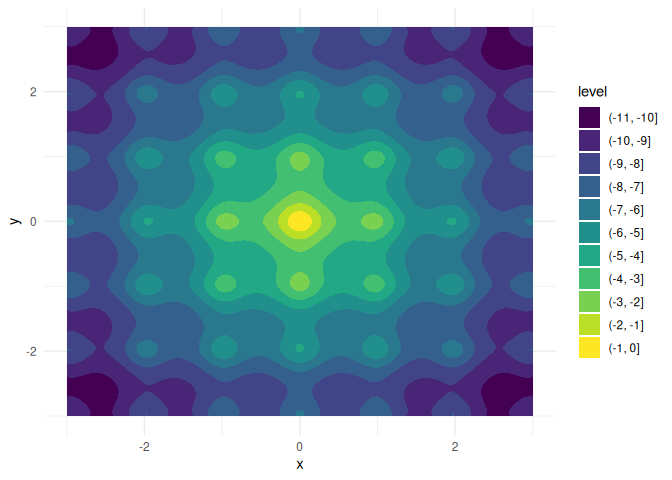
We want to keep a and b fixed here and
optimize over x and y, which are both single
numeric values.
Two problems would occur if we optimized f directly
with, say, stats::nlm:
x and
y).f.Both features are unsupported by stats::nlm and most
other optimizers, but they are supported by {optimizeR}. We
just have to define an objective object that we can later pass to the
optimizers:
objective <- Objective$new(
  f = f,                 # f is our objective function
  target = c("x", "y"),  # x and y are the target arguments
  npar = c(1, 1),        # the target arguments have both a length of 1
  "a" = 20,
  "b" = 20               # a and b have fixed values
)
2. Create the optimizer objects
Now that we have defined the objective function, let’s define the
optimizer objects. For stats::nlm, this is a one-liner:
nlm <- Optimizer$new(which = "stats::nlm")The {optimizeR} package provides a dictionary of
optimizers that can be selected directly via the which
argument. For an overview of available optimizers, see:
optimizer_dictionary
#> <Dictionary> optimization algorithms
#> Keys:
#> - lbfgsb3c::lbfgsb3c
#> - lbfgsb3c::lbfgsb3
#> - lbfgsb3c::lbfgsb3f
#> - lbfgsb3c::lbfgsb3x
#> - stats::nlm
#> - stats::nlminb
#> - stats::optim
#> - ucminf::ucminf
#> - nloptr::nloptr
#> - vntrs::vntrs
#> - ao::ao
#> - optimx::optimr
#> - DEoptim::DEoptim
#> - GenSA::GenSA
Any optimizer that is not contained in the dictionary can still be
put into the {optimizeR} framework by setting
which = "custom" first:
nelder_mead <- Optimizer$new(which = "custom")
#> Use method `$definition()` next to define a custom optimizer.
Then use the $definition() method:
nelder_mead$definition(
  algorithm = pracma::nelder_mead, # the optimization function
  arg_objective = "fn",            # the objective function argument name
  arg_initial = "x0",              # the argument name for the initial values
  out_value = "fmin",              # the optimal function value element
  out_parameter = "xmin",          # the optimal parameter element
  direction = "min"                # the optimizer minimizes
)
3. Set a time limit
Each optimizer object has a field called $seconds, which
equals Inf by default. You can set a different single
numeric value to define a time limit in seconds for the
optimization:
nlm$seconds <- 10
nelder_mead$seconds <- 10
Note that not everything, especially compiled C code, can technically
be timed out. See the help page help("setTimeLimit") for
more details. In addition to the checks by R, the time limit is checked
each time the optimizer evaluates the objective function.
4. Maximize the objective function
Each optimizer object has the methods $maximize() and
$minimize() for function maximization and minimization,
respectively. Both methods require values for two arguments:
objective (either an objective object as defined above
or just a function) andinitial (an initial parameter vector where the
optimizer should start)They optionally accept additional arguments for the objective
function. Optimizer-specific arguments should be set when creating the
optimizer object or via $set_arguments().
nlm$maximize(objective = objective, initial = c(3, 3))
#> $value
#> [1] -6.559645
#>
#> $parameter
#> [1] 1.974451 1.974451
#>
#> $seconds
#> [1] 0.01213908
#>
#> $initial
#> [1] 3 3
#>
#> $error
#> [1] FALSE
#>
#> $gradient
#> [1] 5.757896e-08 5.757896e-08
#>
#> $code
#> [1] 1
#>
#> $iterations
#> [1] 6nelder_mead$maximize(objective = objective, initial = c(3, 3))
#> $value
#> [1] 0
#>
#> $parameter
#> [1] 0 0
#>
#> $seconds
#> [1] 0.00818491
#>
#> $initial
#> [1] 3 3
#>
#> $error
#> [1] FALSE
#>
#> $count
#> [1] 105
#>
#> $info
#> $info$solver
#> [1] "Nelder-Mead"
#>
#> $info$restarts
#> [1] 0Note that
the inputs for the objective function and initial parameter values are named consistently across optimizers,
the output values for the optimal parameter vector and maximum function value are also named consistently across optimizers,
the output contains the initial parameter values, the optimization time in seconds, and other optimizer-specific elements,
pracma::nelder_mead outperforms
stats::nlm here both in optimization time and in
convergence to the global maximum.
The demo above does not cover all features of the package. In particular,
parameter bounds can be passed to $maximize() and
$minimize() via the arguments lower and
upper,
a gradient and a Hessian function can be added to an objective
object via its methods $set_gradient() and
$set_hessian(), which are then used by the optimizers that
support them,
the method $optimize() selects minimization or
maximization via its argument direction,
and a ParameterSpaces object switches between the
parameter vector that an optimizer works on and a list of parameters
that is easier to interpret.
If you have any questions, found a bug, or need a feature, please file an issue on GitHub.